DBMS NOTES FOR GRADE 10
SECTION A: BASIC CONCEPTS
What is Data?
Data are raw facts and figures that have no meaning by themselves. Like 15, Ram, Kathmandu - these are just words and numbers. When we process them, they become information.
What is Information?
Information is processed data that has meaning. Like Ram is 15 years old and lives in Kathmandu.
What is Database?
A database is an organized collection of related data stored together. Example - your school has a database with all student details, teacher records, marks, attendance all kept in an organized way.
What is DBMS?
DBMS stands for Database Management System. It is software that helps us create, manage and use databases. Examples are MySQL, Microsoft Access, Oracle, SQLite. Think of it as a tool to handle all data easily.
What is Table?
A table is where data is stored in rows and columns. Like a notebook with columns for Roll No, Name, Age, Grade.
Row / Record / Tuple
One complete set of information in a table. One row means one student's full details - his roll number, his name, his age, his grade all together.
Column / Field / Attribute
One specific type of information in a table. Like the Name column shows only names of all students.
Cell
The box where a row and column meet. Where one student's one piece of information sits.
Degree of a Table
The number of columns in a table. If your table has Roll No, Name, Age, Grade, City - that is 5 columns, so degree is 5.
Cardinality of a Table
The number of rows in a table. If you have 40 students in your table, cardinality is 40.
Domain
The set of allowed values for a column. Age column can only have numbers from 1 to 100. Grade column can only have A, B, C, D, E.
Schema
The design or structure of the database. How tables are arranged and connected.
SECTION B: TYPES OF KEYS
Keys are very important for exams. You must know all of them.
Primary Key
A primary key is a column that identifies each row uniquely. It cannot be empty and cannot have duplicate values. Every table has only one primary key. Example - Roll Number in student table. No two students can have same roll number and no student can have empty roll number.
Foreign Key
A foreign key is a column that links to the primary key of another table. It creates a relationship between two tables. Example - In Marks table, we have Roll Number column. This Roll Number connects to the Roll Number in Student table. One student can have many marks records so foreign key can have duplicates.
Candidate Key
All columns that have unique values and could become primary key are candidate keys. Example - In student table, Roll Number, Email ID, Citizenship Number all are unique for each student. So all three are candidate keys.
Alternate Key
Among all candidate keys, the ones not chosen as primary key become alternate keys. Example - If we choose Roll Number as primary key, then Email ID and Citizenship Number become alternate keys.
Composite Key
When no single column can uniquely identify rows, we use two or more columns together as primary key. This combination is called composite key. Example - In order details table, Order Number alone may repeat, Product Number alone may repeat. But Order Number + Product Number together is always unique.
Super Key
A super key is any set of columns that can uniquely identify rows. Primary key and candidate keys all are super keys. It is the biggest set of keys.
SECTION C: ADVANTAGES OF DBMS
- First advantage is no data redundancy. Redundancy means duplication. In file system same data gets stored many times. DBMS stores data once and uses it everywhere.
- Second advantage is data consistency. When data is not duplicated, all copies are same. No confusion between different versions.
- Third advantage is data sharing. Many users can access same database at same time. Teachers can check marks while principal checks attendance while clerk enters fees.
- Fourth advantage is data security. DBMS has passwords and permissions. Only authorized people can see or change data. Students cannot change their marks.
- Fifth advantage is data integrity. DBMS has rules that ensure correct data entry. Age cannot be negative. Grade cannot be Z. Roll number cannot be empty.
- Sixth advantage is backup and recovery. DBMS makes it easy to save data and restore if something goes wrong. Computer crash? No problem, restore from backup.
- Seventh advantage is less storage space. No duplication means less space used.
- Eighth advantage is quick data access. Searching is fast. Find one student among thousands in seconds.
- Ninth advantage is data independence. You can change database structure without affecting how data is used.
- Tenth advantage is standardization. All data follows same format everywhere.
SECTION D: DATA INTEGRITY
Data integrity means data is accurate, correct and consistent.
Entity Integrity
Entity integrity says primary key cannot be null and must be unique. Every row must be uniquely identified. No two same students, no student without roll number.
Referential Integrity
Referential integrity says foreign key values must match primary key in other table. You cannot have marks for a student who does not exist. If you delete a student, all his marks should also be deleted.
Domain Integrity
Domain integrity says values must come from allowed set. Age cannot be 200. Grade cannot be Z. Phone number must be 10 digits.
User-defined Integrity
These are business rules specific to your organization. Like pass marks is 40. Or students below age 5 cannot enroll.
SECTION E: CONSTRAINTS IN SQL
Constraints are rules we apply to columns.
NOT NULL
NOT NULL means column cannot be empty. Every student must have a name. So Name column should be NOT NULL.
UNIQUE
UNIQUE means all values in this column must be different. No two students can have same email. So Email column should be UNIQUE.
PRIMARY KEY
PRIMARY KEY means NOT NULL + UNIQUE together. It is the main identifier. Roll Number should be PRIMARY KEY.
FOREIGN KEY
FOREIGN KEY links to another table's primary key. It creates relationship.
CHECK
CHECK validates data before entry. Age must be greater than 5. So we write CHECK (Age > 5).
DEFAULT
DEFAULT gives a default value if nothing is entered. If city not given, put Kathmandu automatically.
SECTION F: SQL COMMANDS
SQL is Structured Query Language. We use it to talk to database.
Types of SQL Commands
- DDL stands for Data Definition Language. It defines structure. Commands are CREATE, ALTER, DROP, TRUNCATE.
- DML stands for Data Manipulation Language. It manages data. Commands are INSERT, UPDATE, DELETE, SELECT.
- DCL stands for Data Control Language. It controls access. Commands are GRANT, REVOKE.
- TCL stands for Transaction Control Language. It manages transactions. Commands are COMMIT, ROLLBACK, SAVEPOINT.
Data Types in SQL
- INTEGER or INT is for whole numbers like 15, 102, -7.
- VARCHAR(size) is for text with maximum limit. VARCHAR(50) means max 50 letters.
- CHAR(size) is for fixed length text. CHAR(10) means exactly 10 letters, if you write less, spaces are added.
- TEXT is for long text like paragraphs.
- DECIMAL(p,s) is for decimal numbers. DECIMAL(5,2) means total 5 digits with 2 after decimal like 123.45.
- FLOAT is also for decimal numbers.
- DATE is for date values like '2024-12-25'.
- TIME is for time values like '14:30:00'.
- DATETIME is for both date and time like '2024-12-25 14:30:00'.
- BOOLEAN is for true or false values.
- BLOB is for binary data like images and files.
CREATE TABLE Command
CREATE TABLE is used to make new table.

Example
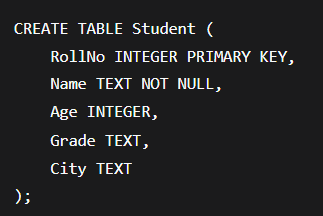
This creates a Student table with RollNo as primary key, Name cannot be empty, Age as number, Grade as text, City as text.
Another example with more constraints
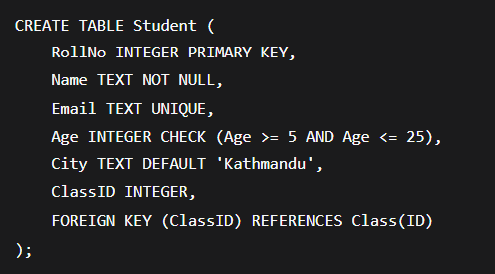
This creates Student table with primary key, not null, unique, check, default and foreign key constraints.
INSERT INTO Command
INSERT INTO is used to add new records.
Syntax

Example

This inserts a complete record for Ram with all values.

This inserts a complete record for Hari.
You can also specify columns

SELECT Command
SELECT is used to see data. This is the most important command for exams.
To see everything from table

This shows only Name and Age columns.
To see with condition

This shows only students older than 15.
More examples

This shows students with grade A.

This shows students from Kathmandu.

This shows name and grade of students age 14.
UPDATE Command
UPDATE is used to change existing data.
Syntax

Example

This changes grade of roll number 1 to A+.
To change multiple columns

This changes both grade and city for roll number 2.
Be careful with WHERE. If you forget WHERE, it will update all rows.

This makes all students grade A.
DELETE Command
DELETE is used to remove records.
Syntax

Example

This removes the student with roll number 3.
To delete all rows but keep table

Table becomes empty but still exists.
ALTER TABLE Command
ALTER TABLE is used to change table structure.
To add new column

This adds a new Phone column to Student table.
To remove a column

This removes the Age column from Student table.
To rename a column

This renames Name column to StudentName.
To modify column type

This changes the data type of Age column.
DROP TABLE Command
DROP TABLE removes entire table from database.
Syntax

Example

This deletes the whole Student table permanently. Cannot be undone easily.
TRUNCATE TABLE Command
TRUNCATE removes all rows quickly but keeps table structure.
Syntax

Example

All students gone but empty Student table still exists.
SECTION G: OPERATORS IN SQL
Comparison Operators
Equal to is =

This shows students with age exactly 15.
Greater than is >

This shows students older than 15.
Less than is <

This shows students younger than 15.
Greater than or equal is >=

This shows students age 15 and above.
Less than or equal is <=

This shows students age 15 and below.
Not equal is <> or !=

This shows students not age 15.
Logical Operators
AND means both conditions must be true

This shows students older than 15 AND have grade A.
OR means at least one condition must be true

This shows students older than 15 OR have grade A.
NOT means opposite condition

This shows students not from Kathmandu.
Special Operators
BETWEEN is for range

This shows students age 14 to 16. Same as Age >= 14 AND Age <= 16.
IN is for matching any in a list

This shows students with grade A, B or C.
LIKE is for pattern matching. % means any number of characters. _ means exactly one character.

This shows names starting with R.

This shows names ending with a.

This shows names like Ram, Rim, Rom - three letters starting with R ending with m.
IS NULL checks for empty values

This shows students with no phone number.
IS NOT NULL checks for non-empty

This shows students with phone number.
SECTION H: ORDER BY and DISTINCT
ORDER BY
ORDER BY sorts the result.
Ascending order means small to big. This is default.

This shows students sorted by age from smallest to largest.
Descending order means big to small.

This shows students sorted by age from largest to smallest.
Sort by name alphabetically

This shows students sorted by name A to Z.
Sort by grade, then by age

This shows students sorted first by grade, then by age within same grade.
DISTINCT
DISTINCT removes duplicate values.

This shows all unique cities, each city only once.

This shows A, B, C, D without repetition.
DELETE
DELETE removes rows but keeps table structure. You can use WHERE to delete specific rows.

This removes only roll number 5.

SECTION I: DELETE vs DROP vs TRUNCATE
Students often confuse these. Here is clear difference.
This removes all rows but table structure remains.
It is slower but can be undone with ROLLBACK in some cases.
DROP
DROP removes the entire table completely

Table structure and data both gone. Cannot be undone easily. You have to CREATE again to use table.
TRUNCATE
TRUNCATE removes all rows quickly.

Table structure remains but all data gone. Faster than DELETE but cannot use WHERE. Cannot be undone easily.
SECTION J: MORE EXAMPLES WITH DIFFERENT CONDITIONS
Using AND operator

Shows students older than 15 with grade A.
Using OR operator

Shows students older than 15 or with grade A.
Using NOT operator

Shows students not from Kathmandu.
Using BETWEEN

Shows students age 14 to 16.
Using IN

Shows students with grade A or B.
Using LIKE

Shows names starting with R.
Using IS NULL

Shows students with no phone.
Using IS NOT NULL

Shows students with phone.
SECTION K: COMPLETE EXAMPLES WITH MULTIPLE FEATURES
Example 1

Shows students older than 14 sorted by age descending.
Example 2

Shows unique cities where students have grade A.
Example 3

Shows name and age of students whose name starts with R and live in Kathmandu.
Example 4

Updates multiple columns for roll number 5.
Example 5

Deletes all students younger than 10.
SECTION L: ALL SQL COMMANDS QUICK SUMMARY
CREATE TABLE

Creates new table.
INSERT INTO

Adds new record.
SELECT

Shows data.
UPDATE

Modifies existing data.
DELETE

Removes records.
ALTER TABLE

Changes table structure.
DROP TABLE
\
Removes entire table.
TRUNCATE

Removes all rows quickly.
SECTION N: QUICK ONE-LINER REVISION
- Database is organized collection of data.
- DBMS is software to manage database.
- Table stores data in rows and columns.
- Row is one complete record.
- Column is one field.
- Primary key uniquely identifies rows.
- Foreign key links tables.
- Candidate keys are potential primary keys.
- Alternate keys are candidate keys not chosen.
- Composite key uses multiple columns as primary key.
- Degree is number of columns.
- Cardinality is number of rows.
- Data redundancy is duplication of data.
- Data consistency means data is accurate everywhere.
- Data integrity means data follows rules.
- NOT NULL means column cannot be empty.
- UNIQUE means no duplicates allowed.
- DEFAULT gives default value.
- CHECK validates data.
- CREATE TABLE makes new table.
- INSERT INTO adds new records.
- SELECT shows data.
- UPDATE changes existing data.
- DELETE removes records.
- ALTER TABLE changes table structure.
- DROP TABLE removes entire table.
- TRUNCATE removes all rows quickly.
- WHERE is used for conditions.
- LIKE is for pattern matching.
- % means any characters.
- _ means one character.
- BETWEEN is for range.
- IN matches list values.
- ORDER BY sorts data.
- ASC is ascending.
- DESC is descending.
- DISTINCT removes duplicates.
- DDL defines structure.
- DML manages data.
- INTEGER is for whole numbers.
- VARCHAR is for text.
- DATE is for dates.
SECTION O: EXAM WRITING TIPS
- Always write answers in points for theory questions. Examiners like points.
- Underline important words like Primary Key, Foreign Key, NOT NULL.
- For SQL questions, write command neatly on separate line.
- Draw small table to show result of SELECT query if time permits.
- Read question twice before answering.
- For 2 marks questions, write definition and one example.
- For 4 marks questions, write definition, example, and 2-3 points.
- For difference questions, make two columns or write in points.
- Practice writing SQL commands on paper before exam.
- Memorize all key definitions by heart.
- Remember at least 5 advantages of DBMS.
- Know all key types with examples.
- Be clear between DELETE, DROP, TRUNCATE.
- Practice all SELECT queries with WHERE conditions.
- Remember LIKE operator patterns.
- Know how to use ORDER BY.
- Understand constraints properly.
SECTION P: LAST MINUTE MEMORY TIPS
- PK means Primary Key which is Unique and Not Null.
- FK means Foreign Key which links tables.
- CK means Candidate Key which can be PK.
- AK means Alternate Key which is not chosen as PK.
- Degree means Columns count.
- Cardinality means Rows count.
- DDL commands are CREATE, ALTER, DROP, TRUNCATE.
- DML commands are INSERT, UPDATE, DELETE, SELECT.
- LIKE 'A%' means starts with A.
- LIKE '%A' means ends with A.
- LIKE '%AM%' means contains AM.
- BETWEEN means range.
- IN means list matching.
- ORDER BY ASC means small to big.
- ORDER BY DESC means big to small.
- DELETE removes data, DROP removes table.
- NOT NULL means must have value.
- UNIQUE means no duplicates.
- DEFAULT means automatic value if not given.
- CHECK means validation rule.