Introduction
Programming becomes messy when everything is written in one giant block. To avoid chaos, programmers break a big program into smaller, meaningful pieces.
This idea is called Modular Programming.
In modular programming:
- A big program is divided into modules (small blocks).
- Each module performs a specific task.
- There is always one main module and many optional sub-modules.
- A module is also called a procedure.
- This makes programs easier to read, understand, test and reuse.
Advantages of Modular Programming
- Different programmers can work on different modules at the same time.
- Errors are easier to find and fix.
- Same module can be used again in other parts of the program.
- The program becomes clear and easier to read.
- Designing, modifying and updating code becomes simple.
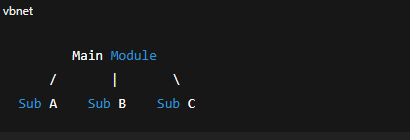
Main Module and Sub-Modules
Main Module: The starting part of the program.
Sub Modules: Smaller blocks created to perform special tasks (like calculating, printing, checking, etc.)
Diagram:
Modular Programming in QBASIC
QBASIC supports modular programming in 2 ways:
- Sub-procedure (SUB…END SUB)
- Function-procedure (FUNCTION…END FUNCTION)
A) SUB-PROCEDURE
What is a Sub-procedure?
A sub-procedure is a small part of a program that performs a task but does NOT return any value to the main module.
Written as:
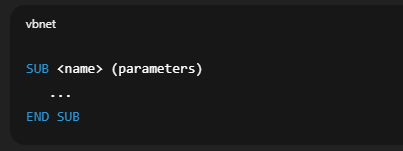
A sub-procedure must be:
Declared
Defined
Called
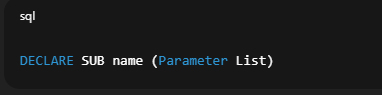
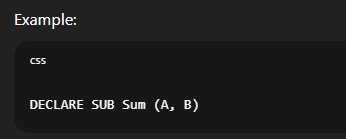
1. Declaration Part
Before using a sub-procedure, we declare it using DECLARE SUB.
Syntax:
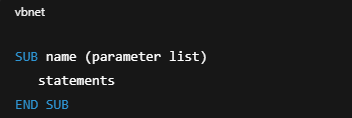
2. Definition Part
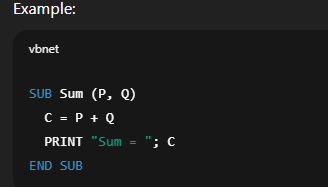
This is the block where we write the actual code for the sub-procedure.
Syntax:
3. Calling the Sub-Procedure
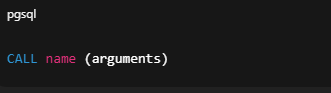
We use CALL from the main module.
Syntax:
Example:

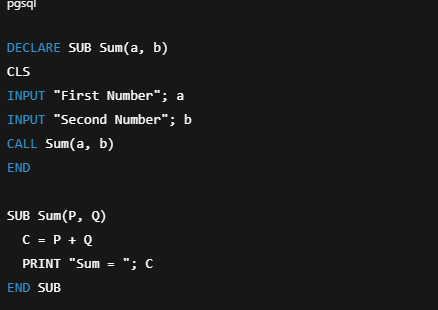
Complete Example (Sum of Two Numbers)
Call by Reference and Call by Value
1. Call by Reference (Default)
The memory address of the variable is passed.
Changes in sub-module affect main-module.
Example Output: 15 10
2. Call by Value
Only the value is sent.
- Changes inside sub-module DO NOT affect main module.
- Done by using double parentheses.
- Example Output: 5
Formal Parameter vs Actual Parameter
Formal Parameters:
Variables used in the DECLARE and SUB/FUNCTION definition.
Actual Parameters:
Real values passed during CALL (from main program).
Local and Global Variables
Local Variable
Declared inside a module.
Only works inside that module.
Global Variable
Can be used in all modules.
Declared using:
- COMMON SHARED (main module)
- DIM SHARED (main module)
- SHARED (inside sub-module)
Examples of Sub-Procedures
Area of Circle
Multiplication Table
Odd/Even Check
First 10 Natural Numbers
Palindrome Check
Area and Volume of Room
(These are already included above; rewritten explanations available if needed.)
B) FUNCTION-PROCEDURE
Functions are like small machines that:
Take input (parameters)
Perform calculation
Always return a value
Written as:
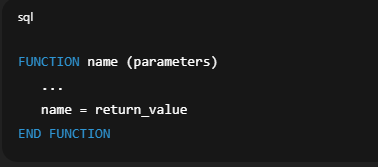
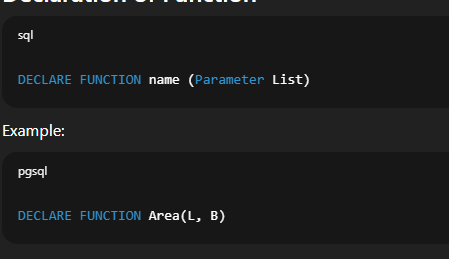
Declaration of Function
Calling a Function
Two ways:
1. Assign to variable
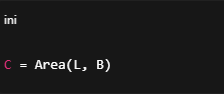
2. Print directly

Example (Area of Rectangle)
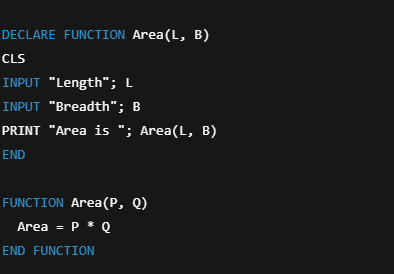
Examples of Function Procedures
- Simple Interest
- Circumference
- Smallest Number
- Vowel Count
- Sum of Digits
- Reverse String
- Area and Volume
Summary (Exam-Focused Points)
- Modular programming means writing programs in multiple modules.
- Two kinds of modules in QBASIC:
- Sub-Procedure (no return value)
- Function-Procedure (returns value)
- DECLARE SUB and CALL are used for sub-procedures.
- DECLARE FUNCTION and assignment/PRINT are used for functions.
- Sub-procedure uses SUB…END SUB.
- Function uses FUNCTION…END FUNCTION.
- Formal parameters: used during declaration/definition.
- Actual parameters: used during CALL.
- Local variables: work only inside the module they are declared.
- Global variables: accessible from all modules using SHARED.